

Quick answer: Set response format and Spice Level for the current chat, use asterisks for roleplay actions, and reserve OOC or editing for deliberate corrections. Editing an earlier message removes the branch after that point.
Separate dialogue, actions, and control instructions
Normal text is treated as dialogue or a direct message. For roleplay actions, the official guide uses asterisks, such as *I open the door and look outside.* Keep the action and spoken line clear enough that the companion can tell what happened and what was said.
AI Video Gallery
A preview of selected portrait videos and AI character images.
Choose response format and Spice Level independently
SMS mode produces several shorter replies, while Paragraph mode produces one longer response. Spice Level controls content intensity through the current labels displayed in Chat Settings. Changing one control does not automatically change the other, and an established conversation may continue following its earlier pattern until you give a clear transition instruction.
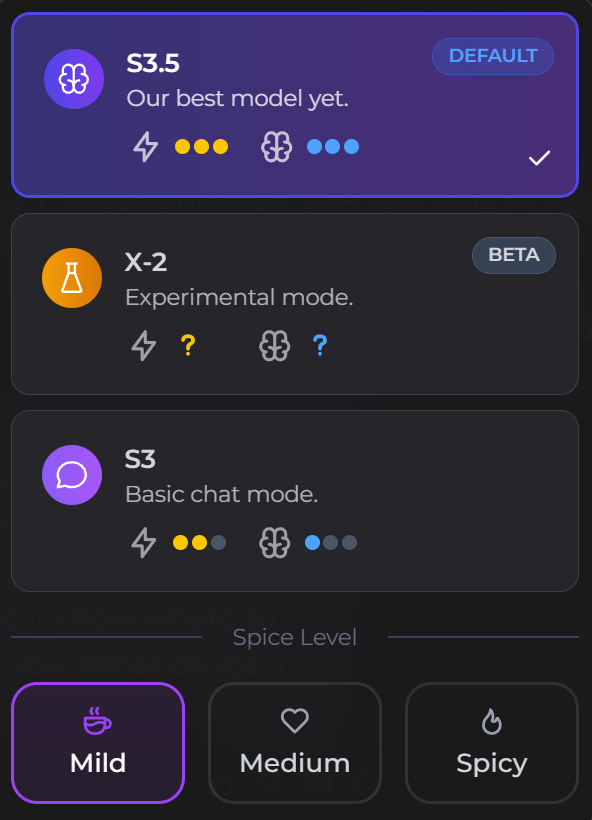
Use the SMS and Paragraph reply-format comparison when deciding between the two modes. Check the current interface before relying on a particular model name or Spice Level label because available controls can change.
Check message limits and text-to-speech separately
The current documentation says only user messages count toward chat limits and that the reset window begins with the first user message. Text-to-speech is a separate speaker-button action. At the time of checking, the official table lists 10 Moments per 100 characters, applies the cost to the final enhanced text, and requires at least 20 characters. Review the Moments balance and usage-history workflow before repeated playback when cost matters.
Use OOC for direction and editing for a new branch
Use the OOC scene-steering workflow for scene direction, a boundary, a clarification, or a response-style correction. Use a normal in-story message when the instruction belongs inside the roleplay.
Editing an earlier message can produce a new continuation, but the official documentation says the action behaves like Time Travel: the conversation after the edited point is removed. Copy any permitted information you need before confirming, and review the Time Travel branch-and-memory deletion warning before editing an earlier message.
Keep identity and continuity in the correct controls
The companion normally follows the language and recent context of the active conversation. Put stable user identity in a Persona when the plan supports it, and use saved memory for facts learned during chat. Do not repeat a long biography in every message when a persistent control is available.
When exploring a different storyline, use the separate-or-shared memory-scope workflow for another chat rather than repeatedly rewriting the same thread.
Test one change at a time
- Record the companion, chat, Persona, response mode, and Spice Level.
- Send one neutral request and one roleplay request.
- Change only the control being evaluated.
- Compare the next reply before changing anything else.
SecretOpedia’s Secrets AI chat resource hub connects these controls to memory and media workflows. The Secrets AI review covering chat controls and plan limits provides wider plan and value context.
If messages will not send or the chat will not load, follow the checks for Secrets AI messages that will not send.
When the available model names or Spice labels have changed since an older screenshot, use the live-interface method for choosing a mode and testing one intensity change at a time.
Sources checked 2026-07-12: Chat Features, OOC Commands, Time Travel, Personas.
