

Quick answer: Put a direct instruction inside parentheses and begin with OOC:. Use a standalone OOC message for an important correction; use mixed content only when the instruction belongs beside the current roleplay action in the same turn.
Use the official syntax
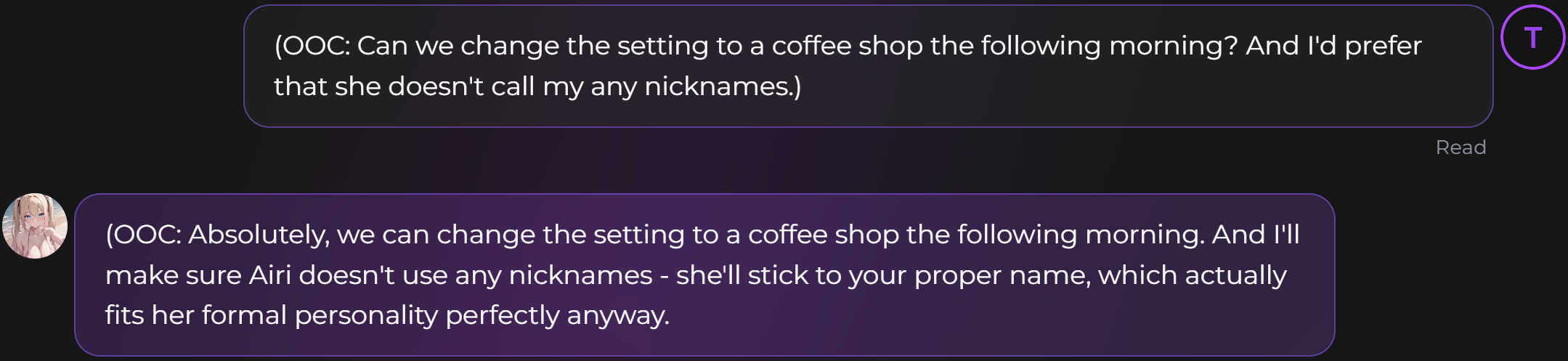
The official guide accepts parentheses, brackets, or double parentheses, with an OOC prefix. A clear example is: (OOC: Please move the scene to the next morning and stop using that nickname.)
AI Video Gallery
A preview of selected portrait videos and AI character images.
Choose OOC for the right kind of control
- Scene direction: change location, time, or pacing.
- Boundaries: stop a nickname, topic, or behavior.
- Clarification: confirm where the characters are or what happened.
- Style feedback: request more detail, less narration, or a different tone.
Do not use OOC for information that should exist as part of your character’s biography. Put stable identity and background in a Persona, and keep long-term facts in memory.
Standalone versus mixed messages
A fully OOC message asks the AI to respond outside the roleplay. A mixed message combines dialogue or action with a short OOC note; the companion continues the scene while applying the instruction. For a major correction, standalone OOC is easier to interpret.
Make instructions specific and test one change
- Name the exact behavior to change.
- Describe the desired replacement.
- Keep the instruction short.
- Check the next reply before adding another instruction.
“Be better” gives little direction. “Use one detailed paragraph, keep the scene in the café, and address me by my Persona name” gives observable criteria.
Know what OOC does not replace
OOC guides the current interaction. It is not a substitute for a persistent user identity defined with a Persona, the workflow for saving lasting facts in Secrets AI memory, or the Time Travel workflow for replacing an existing branch. The official guide says OOC works across chat modes, although it may work best in newer modes.
SecretOpedia’s Secrets AI chat-control resources connect these controls into a complete workflow. Use the Secrets AI review covering chat, memory, and plan access for a broader assessment of conversation, memory, and plan requirements.
If a clear standalone command is repeatedly ignored in new chats, follow the checks for a companion that keeps breaking character.
Use OOC sparingly enough that the roleplay remains readable. Several OOC notes in one message can conflict, especially when one asks for a tone change while another changes scene, identity, and response length. Prioritize the most important correction, observe one reply, then add another direction if needed.
When a preference should apply across future chats, move it into a Persona or a saved memory after confirming that the wording works. OOC is best for immediate direction; stable profile rules belong in persistent controls.
A useful OOC instruction describes the next response rather than rewriting the entire character. For example, ask for clearer dialogue, a slower scene, or a specific boundary. Avoid stacking unrelated rules in one command. Short, observable instructions make it easier to decide whether the companion followed the direction and whether the wording should be saved elsewhere.
Sources checked 2026-07-12: OOC Commands, Chat Features, Personas.
