

Quick answer: Secrets AI saves important information you share in chat and uses it in later replies. Memory is per companion, Smart Mode searches memories and past conversations before a response, and the Memory panel lets you review importance, duplicates, and outdated facts.
How a memory is created
The official workflow is automatic: you share information, the companion detects an important detail, the detail is saved, and it can be referenced later. The system does not pull personal information from outside what you share in the service.
AI Video Gallery
A preview of selected portrait videos and AI character images.
What Smart Mode changes
The current Memory System page says Smart Mode searches saved memories and past conversations before every reply. It can be toggled per chat in Chat Settings and is listed as on by default. The thinking indicator shows when that search is occurring.
Review the Memory panel
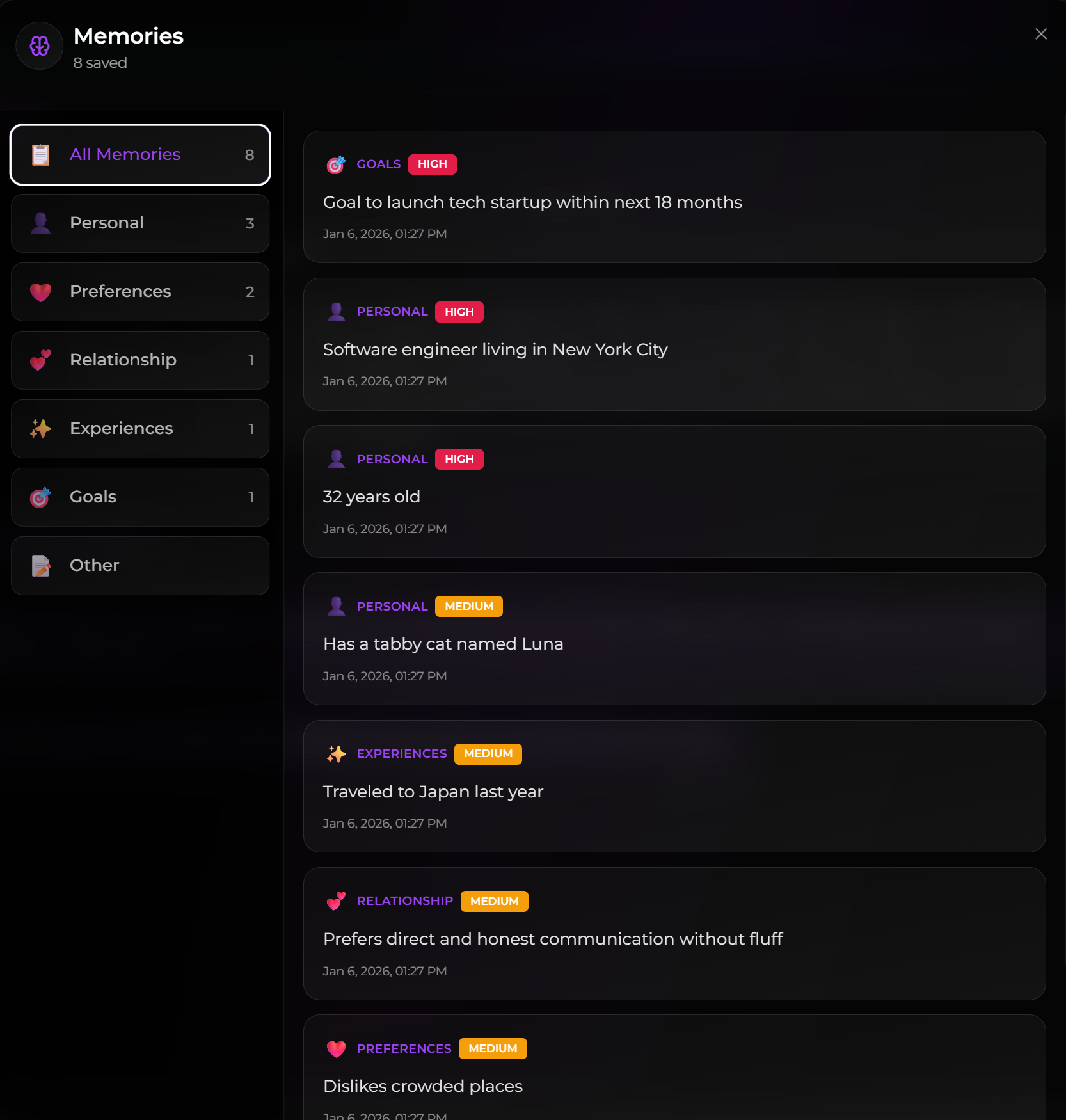
The panel groups saved facts into categories and shows importance levels such as HIGH, MEDIUM, and LOW. Periodically check for outdated information, duplicate entries, and minor details that have been given too much importance.
Understand scope and companion boundaries
Each companion has its own memory. Different companions do not automatically share what another companion knows. Within one companion, a chat can use private memory or a shared Memory Group. The Multiple Chats comparison of private memory and shared Memory Groups explains the difference.
Add, update, and remove information
- Ask the companion to remember an important fact.
- Correct an outdated fact naturally, such as “Actually, my job changed.”
- Ask the companion to update the relevant memory.
- Delete an incorrect memory from the panel when needed.
Deletion is permanent. Make sure the item is genuinely wrong or no longer wanted before removing it.
How Time Travel affects memory
The official documentation says memories created from messages removed by Time Travel are also removed. Review the panel before rewinding a long branch. Review the Time Travel warning for branch-created memories before confirming a rewind.
For practical habits that improve what gets saved and recalled, continue to the steps for improving what gets saved and recalled. SecretOpedia’s Secrets AI memory resource hub organizes all related tutorials, while the Secrets AI review covering memory depth and plan differences provides wider product context.
If a memory appears in the panel but is not recalled, follow the checks for a saved memory that is not recalled.
Recent chat context and saved memory are different. A companion can refer to something mentioned a few messages ago even when it was never stored in the Memory panel. Conversely, a saved item can exist but not be selected for one particular reply. Check the panel before deciding which system failed.
Memory is also not a shared account notebook across every companion. Each companion maintains its own information, and Memory Groups connect chats for that companion rather than combining every character into one profile.
Use the Memory panel as the source of truth for saved items. A companion saying “I remember” is conversational output, not proof that a new entry was created. When a fact matters, check whether it appears, whether its wording is correct, and whether the active chat belongs to the memory scope you intended.
Sources checked 2026-07-12: Memory System, Multiple Chats, Group Chats, Time Travel.
