
Quick answer: A Public Profile is optional. Create one only when you intend to share public characters or media, choose a unique username, activate profile visibility, and review every image, video, and character before making it public.
Decide whether a public profile serves a real purpose
Secrets AI can be used without a Public Profile. The profile is for sharing selected characters and generated media through a page such as /u/your-username. It is not required for private chats, private images, or private custom characters.
Before activation, decide whether the profile is a creator portfolio, a place to share one public character, or a curated selection of media. A defined purpose makes visibility decisions easier.
AI Video Gallery
A preview of selected portrait videos and AI character images.
Create the username, bio, and avatar
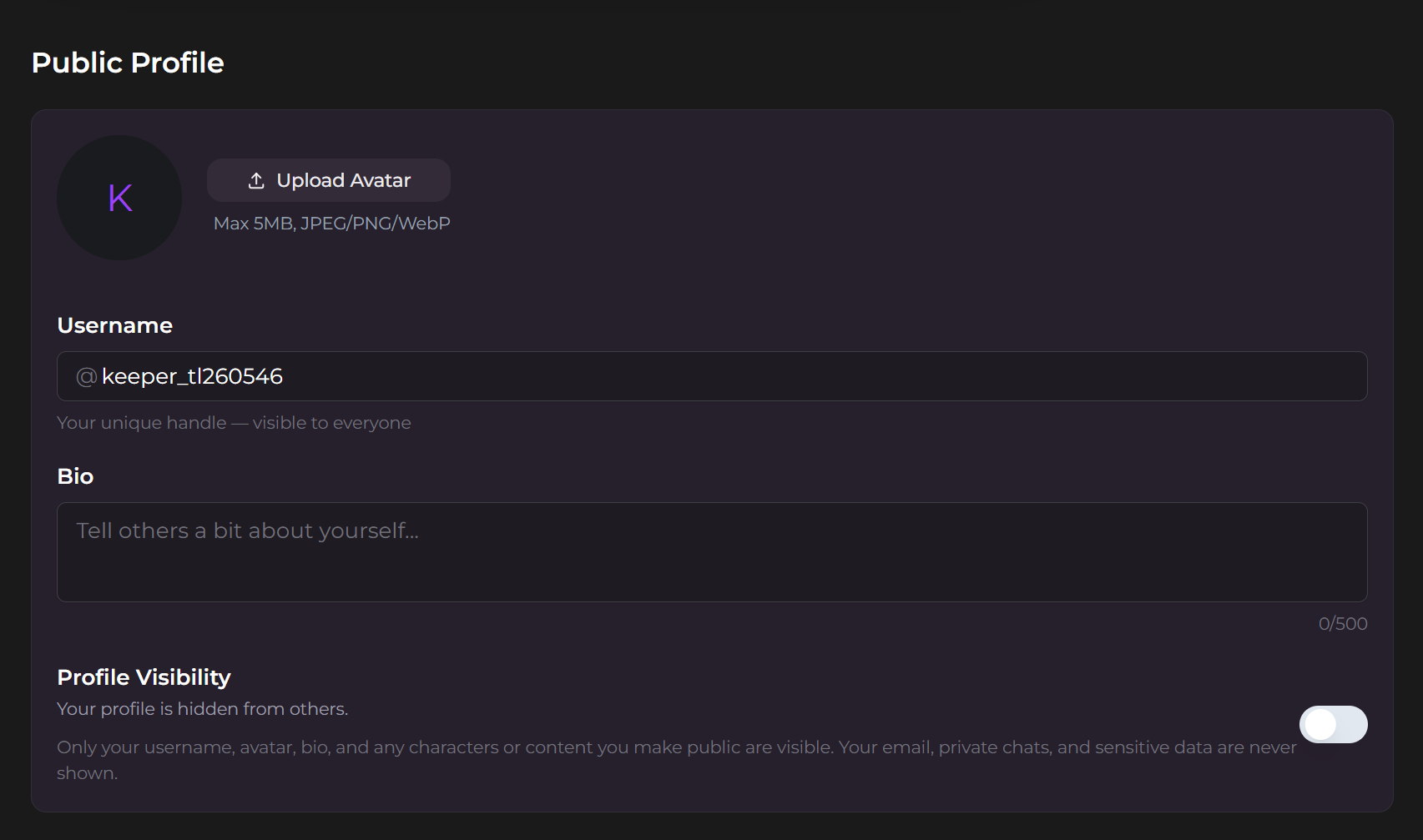
- Open Settings and find Public Profile.
- Choose an available username.
- Add an optional bio of up to 500 characters.
- Upload an optional avatar.
- Turn on profile visibility only after reviewing the public fields.
The current documentation says usernames can later be changed when the new value is available and meets the current format requirements. Avoid putting an email address, legal name, location, or other sensitive information in a public username or bio unless publication is intentional.
Publish media and characters deliberately
An active profile does not make every account item public. Images and videos use individual visibility controls, while a custom character must have Public status before appearing on the Characters tab. The official profile guide says only content explicitly made public is displayed.
Use the custom-character visibility and sharing workflow before requesting public status for a companion. Sharing and public approval have consequences that are different from keeping a character private.
Use highlights as a curated portfolio
The current Public Profiles page allows up to 12 highlighted images or videos. Pinned items appear above the content tabs and can be reordered. Choose items that represent the intended profile rather than pinning every recent generation.
Use the tag and filter workflow for organizing generated images and videos before selecting highlights. A clean Collection makes it easier to verify which file is ready for public visibility.
Understand hide, deactivate, and delete
- Make an item private: removes that image or video from public view without deleting the file.
- Deactivate the profile: makes the profile inactive while the documentation says follower relationships are preserved.
- Delete an image: removes it from the profile and any highlighted position.
These actions are not interchangeable. When the goal is temporary privacy, change visibility instead of deleting the item.
Review the profile as another user would
Open the public URL in a signed-out or private browser window. Check the username, bio, avatar, Characters tab, media tabs, highlights, and links. Confirm that no private chat text, sensitive caption, or unintended image is visible.
SecretOpedia’s Secrets AI public-sharing and creator resources connect this workflow with character and media guides. The Secrets AI review covering creator tools, privacy controls, and platform suitability provides wider decision context.
Sources checked 2026-07-12: Public Profiles, Custom Characters, Privacy Policy.
